BCCP Management
Find a BCCP
See Search and Browse CC Library to find the BCCP needed. For more information about finding a BCCP see also Find a BCCP. Make sure you are on a published release branch for EUCC.
View detail of a BCCP
Create a new BCCP
To create a new end user BCCP see Create a new BCCP; for end users, the create button is available on a published release branch instead of the Working branch.
Edit detail of a BCCP
To edit an end user BCCP please see Edit detail of a BCCP.
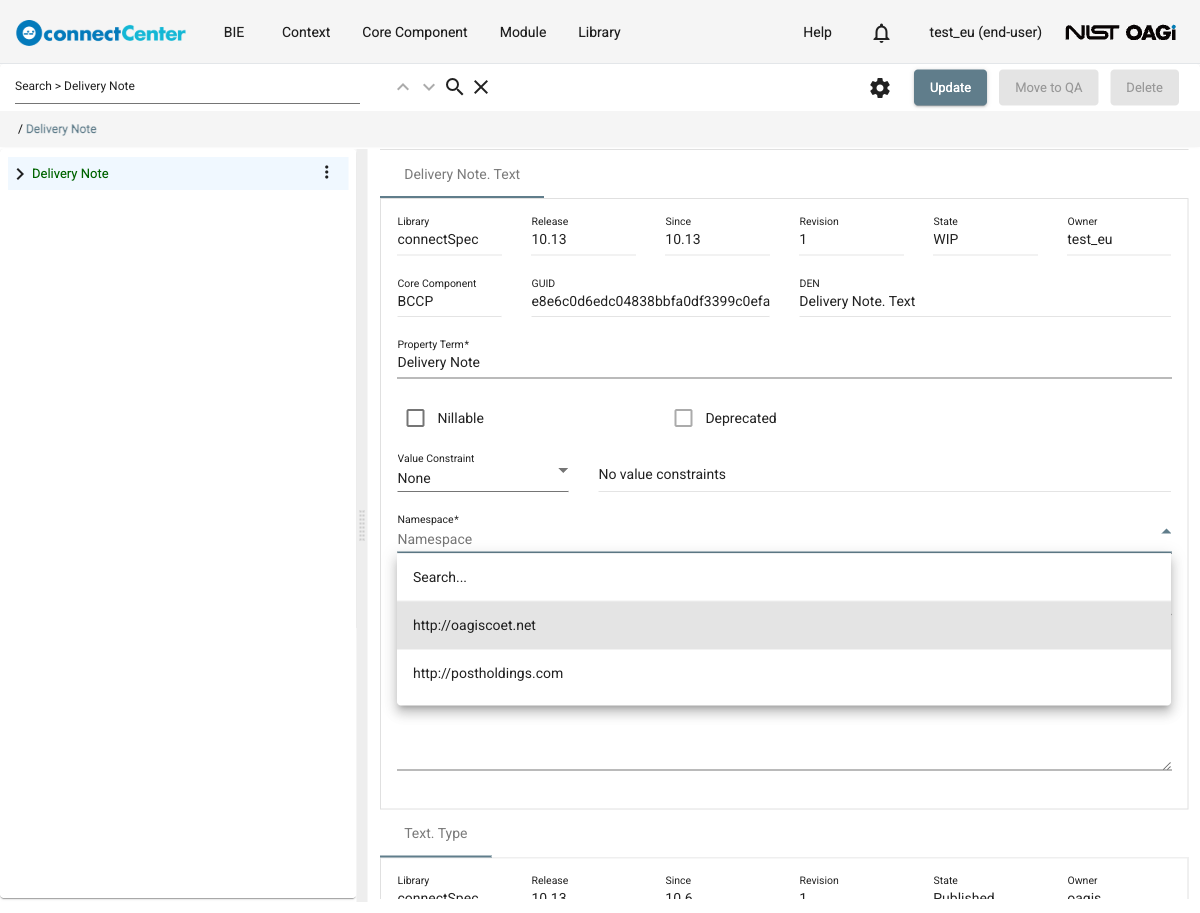
When an end user is editing the details of a BCCP, only Non-standard namespaces can be selected in the "Namespace" drop-down list. See the Non-standard Namespace Management section to create a Non-standard namespace if needed or the Namespace Management section about how namespaces are used in connectCenter.
The screenshot below shows an end user BCCP in the WIP state on a published release branch. Instead of the developer's "Move to Draft" button, the page offers "Move to QA", and the "Namespace" drop-down lists only Non-standard namespaces.
Delete a newly created BCCP
See Delete a newly created EUCC.
Restore a deleted BCCP
Amend a BCCP
An end user BCCP in the Production state can be amended where certain backwardly-compatible changes can be made. Any end user can amend a production BCCP. He/she does not have to be its owner; upon amending, the ownership is transferred to the amending end user. To do that:
-
Find a BCCP in the desired published release branch.
-
Click the "Amend" button at the top-right corner of the page and confirm in the "Amend this BCCP?" dialog. The BCCP goes into the WIP state and its revision number increases by 1.
-
The following fields can be updated ("Property Term" and "Namespace" are locked during an amendment).
-
"Nillable". It can only be updated from false (unchecked) to true (checked), and it is locked when the previous revision has a fixed value.
-
"Deprecated". It can only be updated from false (unchecked) to true (checked).
-
"Value Constraint". Select "Fixed Value" or "Default Value" in the drop-down (or "None") and specify the value in the adjacent field. The "Fixed Value" option is not selectable when the previous revision is nillable, and a fixed value set in the previous revision cannot be changed. "Value Constraint" is optional.
-
"Definition Source". Specify the source of the definition. This is typically a URI, but the field accepts a free form text. "Definition Source" is optional.
-
"Definition". Specify the description of the BCCP. "Definition" is optional but a warning is given if none is specified.
-
The associated BDT can be changed with the "Change DT" context-menu item on the root node.
-
-
Click the "Update" button at the top right to save changes.
Cancel a BCCP amendment
Change BCCP states
See Change EUCC states.
Transfer ownership of a BCCP
See Transfer ownership of an EUCC.