Manage End User Agency ID Lists
Agency ID List management has its own page which can be accessed under the "Core Component" menu. End-user Agency ID Lists can be managed when a published release branch is selected in the "Branch" filter.
There are two ways to create an Agency ID List. The first way is to base it on (i.e., derive it from) a developer Agency ID List, where both restrictions and extensions are allowed. An end-user Agency ID List cannot be based on another end-user Agency ID List.
The other way is to create one from scratch. Both cases are handled as a brand-new Agency ID List in the WIP state and revision #1.
Find an Agency ID List
Open the "Agency ID List" page by choosing "View/Edit Agency ID List" from the "Core Component" menu. Make sure that the desired published release branch is selected in the "Branch" filter. Then use the "Search by Name" bar to locate the desired Agency ID List, or expand the advanced search area for the "State", "Definition", "Module", "Deprecated", "New", "Owner", "Updater", "Updated start date", "Updated end date", and "Namespace" filters. The table shows the State, Name, Version, Revision, Owner, Module, and Updated on columns; a "Columns" chooser above the table lets you hide or reorder them. A brand-new Agency ID List carries a "New" badge, and a deprecated one carries a "Deprecated" badge next to its state.
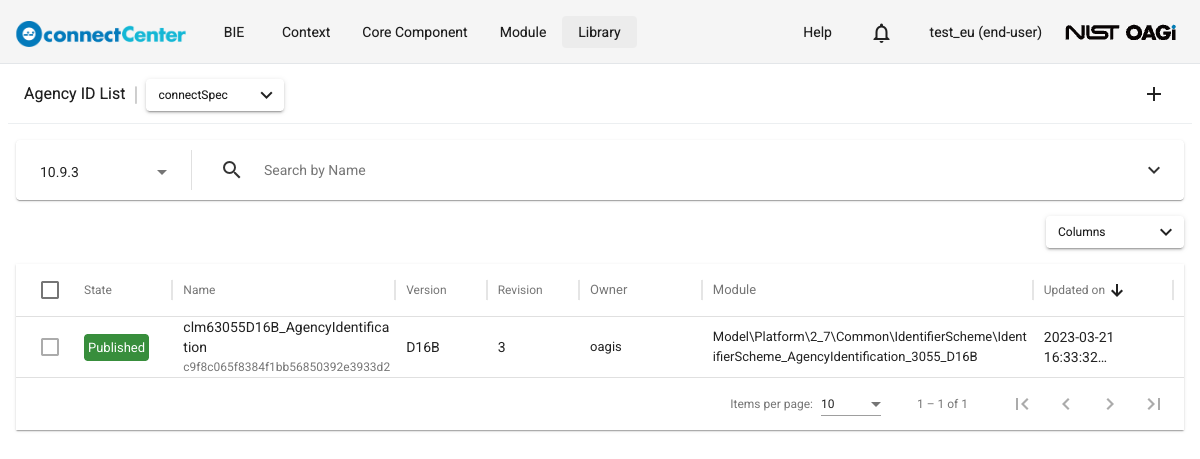
View detail of an Agency ID List
To view Agency ID List detail:
-
Click on the Agency ID List name to open the "Edit Agency ID List" page.
noteClicking somewhere else on an Agency ID List entry will display its textual definition.
The top of the page shows the read-only "Core Component" (always "Agency ID List"), "GUID", "Release", "Revision", "State", and "Owner" fields, plus a "Based Agency ID List" field for a derived list. The speech-bubble icon next to the "Edit Agency ID List" title opens a Comments sidebar where threaded comments and replies can be posted.
Create a brand-new Agency ID List without base
To create a brand-new Agency ID List without base:
-
Open the "Agency ID List" page by selecting "View/Edit Agency ID List" under the "Core Component" menu on the top of connectCenter pages.
-
Ensure that the desired published release is selected in the "Branch" filter. The create button is shown only on a published release branch.
-
Click the plus (+) icon button (tooltip "New Agency ID List") at the top-right of the page.
-
The Agency ID List is created immediately — a "Created" snackbar message appears and the "Edit Agency ID List" page opens. The new Agency ID List is in the WIP state with revision 1, its "Name" defaults to "AgencyIdentification", its "List ID" is pre-filled with a generated GUID, and its "Version" and "Namespace" are empty.
-
Detail of the Agency ID List can be updated including add/change Agency ID List values.
Create a brand-new Agency ID List based on a developer Agency ID List
To create a brand-new Agency ID List based on a developer Agency ID List:
-
Open the "Agency ID List" page by selecting "View/Edit Agency ID List" under the "Core Component" menu on the top of connectCenter pages.
-
Ensure that the desired published release is selected in the "Branch" filter.
-
Open a developer Agency ID List in the Published state to view detail of the Agency ID List.
-
Click the "Derive Agency ID List based on this" button at the top-right of the page. The button appears only when an end user opens a developer Agency ID List in the Published state on a published release branch — this is what prevents basing an end-user Agency ID List on another end-user Agency ID List.
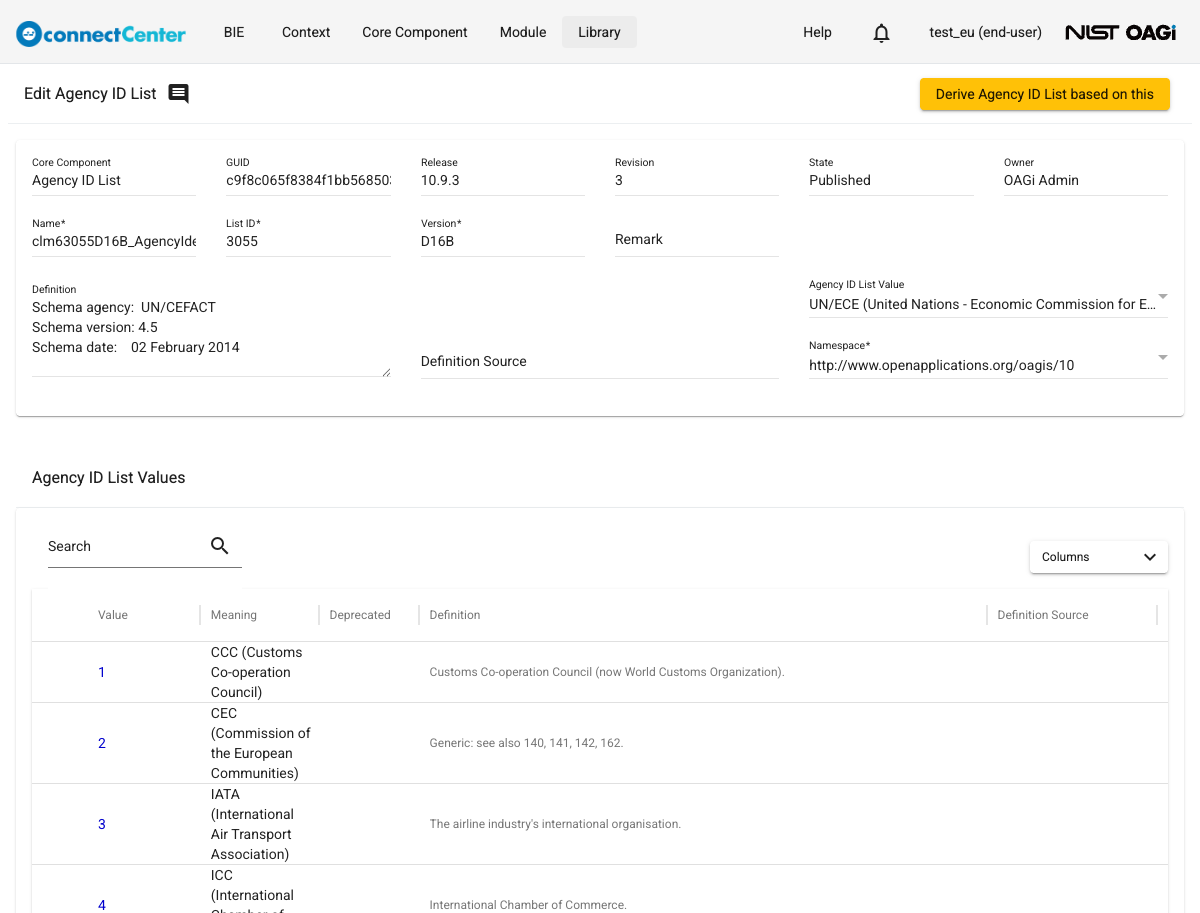
-
The end-user Agency ID List is created immediately and its "Edit Agency ID List" page opens. Detail of the Agency ID List can be updated including add/change Agency ID List values.
It should be noted that the application simply copies the list values from the based Agency ID List, but the derivation relationship is maintained — the read-only "Based Agency ID List" field points back to the developer Agency ID List. Values copied from the based Agency ID List are not fully editable: their "Value" field is locked, and only "Meaning", "Definition", and "Definition Source" can be changed (see Edit detail of a brand-new Agency ID List value). Copied values can, however, be removed from the list, and brand-new values can be added.
Edit detail of a brand-new Agency ID List
This section describes end user Agency ID List editing when its revision number is 1.
-
Make sure you are on a published release branch. Open the "Edit Agency ID List" page according to View detail of an Agency ID List. The Agency ID List has to be in the WIP state, and the current user has to be the owner to be editable. The fields in the detail pane may be updated as follows.
-
"Name". It is the name of the Agency ID List. The value should be a space-separated set of words. Acronyms and plural words should be avoided. Serialization rules will concatenate or abbreviate words per naming and design rules. "Name" is required. If another Agency ID List with the same name already exists, a "Duplicated Properties" dialog warns about it upon update; you may proceed with "Update anyway".
-
"List ID". This is a free form text intended for representing the external/global identifier of the Agency ID List. It is defaulted with a uniquely generated GUID, but it can be changed. "List ID" is required.
-
"Agency ID List Value". This field designates the organization that owns and manages the Agency ID List. This is a self-reference field: it is a searchable dropdown listing the Agency ID List values in the table at the bottom of the page, shown as "Name (Value)". If there is no desired agency in the list, add an Agency ID List value and click the "Update" button at the top right of the page first — a newly added value cannot be selected until the list is saved. "Agency ID List Value" is optional.
-
"Version". This field is a freeform text representing the version of the Agency ID List. The system validates that the combination of "List ID", "Agency ID List Value", and "Version" is unique in the selected branch data; a violation is rejected with the "Invalid parameters" dialog ("Another agency ID list with the triplet (ListID, AgencyID, Version) already exist!"). "Version" is required.
-
"Remark". A free form text (up to 225 characters) for any additional remark about the Agency ID List. "Remark" is optional.
-
"Namespace". Select an end user namespace from the dropdown list. See the Non-standard Namespace Management section to create an end user namespace if needed or how namespace may be used in connectCenter. "Namespace" is required.
-
"Definition". Specify the description of the Agency ID List. "Definition" is optional, but the "Empty Definition" warning dialog is given upon update if none is specified; you may proceed with "Update Anyway".
-
"Definition Source". Specify the source of the definition. This is typically a URI, but the field is free form text. "Definition Source" is optional.
-
"Deprecated". The "Deprecated" checkbox is only applicable when the Agency ID List revision is higher than 1. Therefore, the field is locked.
-
-
Click the "Update" button at the top right to save changes (Ctrl+S, or Cmd+S on macOS, also works). All detail and value changes are staged locally until then, and the "Move to QA" button stays disabled while there are unsaved changes.
-
The end user may also want to perform these other actions on the Agency ID List:
Add a brand-new Agency ID List value to the Agency ID List
An Agency ID List value can be added to an Agency ID List that is in the WIP state and is owned by the current user. The "Agency ID List Values" table at the bottom of the "Edit Agency ID List" page lists the values with the "Value", "Meaning", "Deprecated", "Definition", and "Definition Source" columns; it has its own search box (matching the value, meaning, and definition) and "Columns" chooser. Its "Add" and "Remove" buttons are shown only while the Agency ID List is editable.
-
In the "Agency ID List Values" section of the "Edit Agency ID List" page, click the "Add" button.
-
The "Add Agency ID List Value" dialog pops up where the following fields can be edited.
-
"Value". The value (code) of the Agency ID List value. "Value" is required and must be unique within the list; a duplicate is rejected with a "... already exist" message.
-
"Meaning". Short name or short description of the Agency ID List value. "Meaning" is required.
-
"Definition". Long description of the Agency ID List value. "Definition" is optional.
-
"Definition Source". The source of the definition. This can be any text but usually a URI is specified. It is optional.
-
"Deprecated". The checkbox is disabled when a value is newly added.
-
-
Click the "Add" button at the bottom of the dialog. To get out of the dialog without adding the Agency ID List value, hit the ESC button or click outside of the dialog.
-
Click the "Update" button at the top of the page. Added values are staged locally and saved only when the Agency ID List is updated.
Remove a brand-new Agency ID List value from the Agency ID List
An Agency ID List value can be removed from an Agency ID List only when it was added in the current revision, it is not used, and it is not currently selected as the list's own "Agency ID List Value". The Agency ID List must be in the WIP state and owned by the current user.
-
In the "Agency ID List Values" table on the "Edit Agency ID List" page, click the checkboxes in front of one or more Agency ID List values intended to be removed. Only removable Agency ID List values have their checkboxes enabled; values carried over from a previous revision cannot be selected.
-
Click the "Remove" button next to the "Add" button in the "Agency ID List Values" section.
-
The "Remove Agency ID List Value?" confirmation dialog is displayed. Confirm with the "Remove" button or cancel the removal request.
-
Click the "Update" button at the top of the page to save the removal.
Edit detail of a brand-new Agency ID List value
This section describes the case when the Agency ID List value is brand-new, i.e., an Agency ID List value added to a revision 1 Agency ID List (brand-new Agency ID List) or during an Agency ID List amendment. The Agency ID List must be in the WIP state and owned by the current user. To edit the detail of an Agency ID List value:
-
In the "Agency ID List Values" table on the "Edit Agency ID List" page, click on the row of the Agency ID List value to be updated.
-
The "Edit Agency ID List Value" dialog is open. Detail of the Agency ID List value can be updated as described in Add a brand-new Agency ID List value to the Agency ID List. For a value copied from the based developer Agency ID List of a derived list, the "Value" field is locked; only "Meaning", "Definition", and "Definition Source" can be changed.
-
Click the "Save" button at the bottom of the dialog. To get out of the dialog without saving the changes, hit the ESC button or click outside of the dialog.
-
Click the "Update" button at the top of the page.
When the Agency ID List is not editable (e.g., not in the WIP state or owned by someone else), clicking a row opens the read-only "View Agency ID List Value" dialog instead.
Amend an Agency ID List
An end user Agency ID List in the Production state can be amended. The current user does not have to be the owner of the Agency ID List; upon amending, the ownership is transferred to the amending end user. To amend an Agency ID List:
-
Make sure you are on a published release branch. Open the "Edit Agency ID List" page of an end-user Agency ID List in the Production state.
-
Click the "Amend" button at the top-right corner of the page and confirm in the "Amend this agency ID list?" dialog. An "Amended" snackbar message confirms the amendment.
-
The "Edit Agency ID List" page is refreshed with the Agency ID List whose revision number is incremented by 1 and the state changed to WIP.
-
Detail of the Agency ID List can be updated including add/change Agency ID List values.
Edit detail of an Agency ID List during its amendment
The Agency ID List must have a revision number of at least 2, be in the WIP state, and the current user has to be the owner of the Agency ID List.
-
Open the "Edit Agency ID List" page according to View detail of an Agency ID List, if it is not already opened. The fields in the detail pane may be updated as follows:
-
"Name". It is the name of the Agency ID List. The field is locked and not editable.
-
"List ID". This is a free form text representing the external/global identifier of the Agency ID List. The field is locked, and change is not allowed.
-
"Agency ID List Value". This field designates the value, among the list's own values, that identifies the organization owning and managing the Agency ID List. The field is locked during an amendment.
-
"Version". This field is a freeform text representing the version of the Agency ID List. The system validates that the combination of "List ID", "Agency ID List Value", and "Version" is unique in the current branch data. Although the version should generally be different from prior revisions, connectCenter does not validate this. "Version" is required.
-
"Namespace". The field is locked and cannot be changed.
-
"Definition". Specify the description of the Agency ID List. "Definition" is optional but a warning is given if none is specified.
-
"Definition Source". Specify the source of the definition. This is typically a URI, but the field accepts a free form text. "Definition Source" is optional.
-
"Deprecated". The checkbox becomes editable during an amendment: check it to deprecate the whole Agency ID List. It is locked if the previous revision was already deprecated.
-
-
Click the "Update" button at the top-right of the page to save changes.
The end user may also want to perform these other actions on the Agency ID List:
Revise detail of an Agency ID List value
This section describes the case when the Agency ID List value has existed since the previous revision of the Agency ID List. To revise the detail of an Agency ID List value:
-
In the "Agency ID List Values" table on the "Edit Agency ID List" page where the revision number of the Agency ID List is 2 or more, click on the row of the Agency ID List value to be updated.
-
The "Edit Agency ID List Value" dialog is open. Detail of the Agency ID List value can be updated as follows.
-
"Value". Change is not allowed.
-
"Meaning". Change is allowed, and the field is mandatory.
-
"Definition". Long description of the Agency ID List value. "Definition" is optional.
-
"Definition Source". The source of the definition. This can be any text but usually a URI is specified. It is optional.
-
"Deprecated". Check the checkbox to deprecate the Agency ID List value. The checkbox is locked if the value was already deprecated in the previous revision.
-
-
Click the "Save" button at the bottom of the dialog. To get out of the dialog without saving the changes, hit the ESC button or click outside of the dialog.
-
Click the "Update" button at the top of the page.
Delete a brand-new Agency ID List
To delete an Agency ID List, it must be in the WIP state with revision number 1, and the current user has to be the owner of the Agency ID List. Deletion is soft: the Agency ID List moves to the Deleted state and can later be restored or purged.
To delete an Agency ID List:
-
Go to the "Agency ID List" page by clicking the "View/Edit Agency ID List" menu item under the "Core Component" menu. Make sure a published release branch is selected.
-
There are three ways to delete an Agency ID List:
-
Check the checkbox in front of the Agency ID List you want to delete (checkboxes are enabled only for revision 1 lists in the WIP or Deleted state that you own), then click the trash icon (tooltip "Delete") that appears at the top-right of the page.
-
Click the vertical three-dot icon in the last column of the Agency ID List and select the "Delete" menu item in the context menu.
-
Open the "Edit Agency ID List" page and click the "Delete" button at the top-right corner.
-
-
Confirm (or cancel) the deletion in the confirmation dialog; the confirm button is "Delete anyway".
Restore or purge a deleted Agency ID List
An Agency ID List in the Deleted state can be restored; the end user who restores it becomes its new owner. There are three ways to restore it: select the Deleted row(s) on the "Agency ID List" page and click the "Restore" icon button that appears at the top-right, choose "Restore" from the row's three-dot context menu, or click the "Restore" button on the "Edit Agency ID List" page.
Alternatively, a deleted Agency ID List can be purged, i.e., permanently removed from connectCenter: select the Deleted row(s), click the "Purge" icon button at the top-right, and confirm in the "Purge Agency Id List?" dialog with the "Purge anyway" button. A purged Agency ID List can never be restored.
Cancel an Agency ID List amendment
The end user who is the owner of the Agency ID List being amended can cancel the amendment. In this case, all changes to the Agency ID List are discarded. Agency ID List detail and its owner are rolled back to the pre-amended state. To cancel an Agency ID List amendment:
-
Open the "Edit Agency ID List" page of an Agency ID List in the WIP state and with revision number greater than 1 (i.e., an amended Agency ID List). The current user has to be the owner of the Agency ID List.
-
Click the "Cancel" button at the top-right of the page.
-
Confirm (or cancel) the amendment cancellation in the "Cancel this amendment?" dialog; the confirm button is "Okay". Note that all work done in the amendment will be permanently removed and cannot be recovered.
Change an Agency ID List state
The section covers the toggling between the WIP, QA, and Production states of the Agency ID List. For the detailed meaning of these states, see End user CC states. The current user has to be the owner of the Agency ID List to toggle between these three states. To change the Agency ID List state:
-
Depending on the current state of the Agency ID List, click either the "Move to QA", "Move to Production", or "Back to WIP" button at the top-right corner of the page. The "Move to QA" button is disabled while there are unsaved changes — click "Update" first.
-
Confirm (or cancel) the state change in the "Update state to '...'?" dialog. Moving to Production additionally warns "Once in the Production state it can no longer be changed or discarded." and its confirm button reads "Update anyway" — a Production Agency ID List can only be changed further by amending it.
Transfer ownership of an Agency ID List
To let another end user make changes to an Agency ID List, the current owner has to transfer ownership of the Agency ID List to another end user. End user Agency ID Lists can be transferred only to another end user, and only while the Agency ID List is in the WIP state. (Administrators can also transfer ownership regardless of state or ownership.) To transfer ownership:
-
Go to the "Agency ID List" page by clicking the "View/Edit Agency ID List" menu item under the "Core Component" menu.
-
Find the Agency ID List whose ownership you want to transfer. See Find an Agency ID List.
-
There are two ways to transfer ownership of an Agency ID List:
-
Click the transfer icon (icon with two opposite arrows) next to the owner of the Agency ID List, or
-
Click the vertical three-dot icon in the last column of the Agency ID List and select the "Transfer Ownership" menu item in the context menu.
Both controls are available only for an Agency ID List in the WIP state that is owned by the current user.
-
-
The "Transfer ownership" dialog is displayed listing the accounts the Agency ID List can be transferred to — for an end user, only other end-user accounts. Use the "Search by Login ID" filter on the top to find the desired end user and check the checkbox in front of it. Transferring to yourself is not allowed.
-
Click the "Transfer" button.